
When it’s time to get rid of an old desk, mattress, or fridge in Korea, you can’t just leave it by the bins. Large items are “bulky waste” (daehyeong pyegimul, 대형폐기물) — things too big for a standard volume-rate bag — and they have to be reported and paid for before you put them out. If you don’t read Korean, it can feel daunting at first — but it’s simple once you’ve done it once. This guide walks you through the whole thing step by step, with screenshots and each field of the online form translated. This is part of our waste series; for the everyday rules, start with our waste separation guide.
What Counts as Bulky Waste?
Bulky waste is anything too large for a standard bag. Typical items include:
- Furniture: desks, chairs, beds, mattresses, sofas, wardrobes, shelves
- Large appliances: refrigerators, washing machines, air conditioners, TVs
- Other big items: bicycles, mirrors, luggage, large rugs
Each item has a separate disposal fee based on its type and size, and the exact amount is set by your district (gu, 구), so it varies from place to place.
Step-by-Step: Reporting Online (Seongbuk-gu Example)
Each district runs its own website, but they all work almost the same way. The walkthrough below uses Seongbuk-gu’s “Smart Clean Seongbuk” site (smartclean.sb.go.kr), with a screenshot of each screen — many other districts run the same “Smart Clean” system, including Mapo-gu (the Hongdae and Sinchon areas) and Gwanak-gu (around Seoul National University). To reach your own district’s page, search your gu name plus “대형폐기물” (bulky waste).
1. Read the cautions (주의)
At the top of the page are a few important rules: cancellation and refunds are only possible for items not yet collected, within 7 days of payment; your disposal number is valid for 30 days, for the same item, and can be used once; the scheduled date is not the exact pickup day and can be delayed when volume is high; and free small-appliance disposal isn’t available at apartments — ask your building’s management office (gwalliso, 관리실).
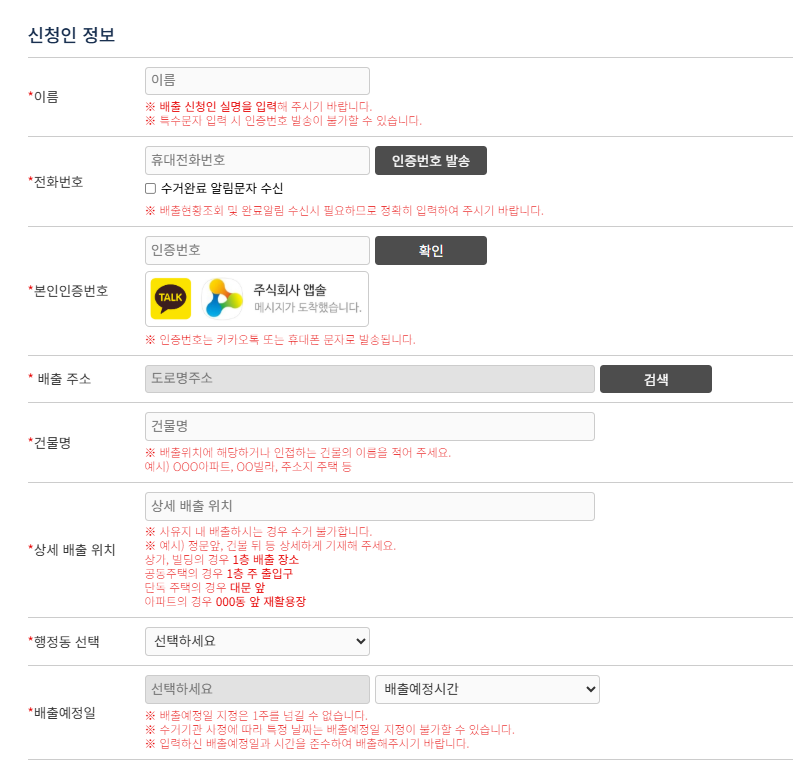
2. Fill in the applicant information (신청인 정보)
- 이름 (Name): your real name. Avoid special characters, or the verification code won’t send.
- 전화번호 (Phone number): your Korean mobile number, then click 인증번호 발송 (Send verification code). You can also tick 수거완료 알림문자 수신 to get a text once collection is done.
- 본인인증번호 (Verification code): the code arrives by KakaoTalk or text message — enter it and click 확인 (Confirm).
- 배출 주소 (Disposal address): click 검색 (Search) to find your road-name address, then add your 건물명 (Building name).
- 상세 배출 위치 (Detailed disposal location): exactly where you’ll leave the item (not on private land) — for example, in front of the main gate, or by your apartment block’s recycling area.
- 행정동 선택 (Select your dong): choose your neighborhood from the dropdown.
- 배출예정일 (Disposal date): pick the date and time you’ll put the item out — within about a week.
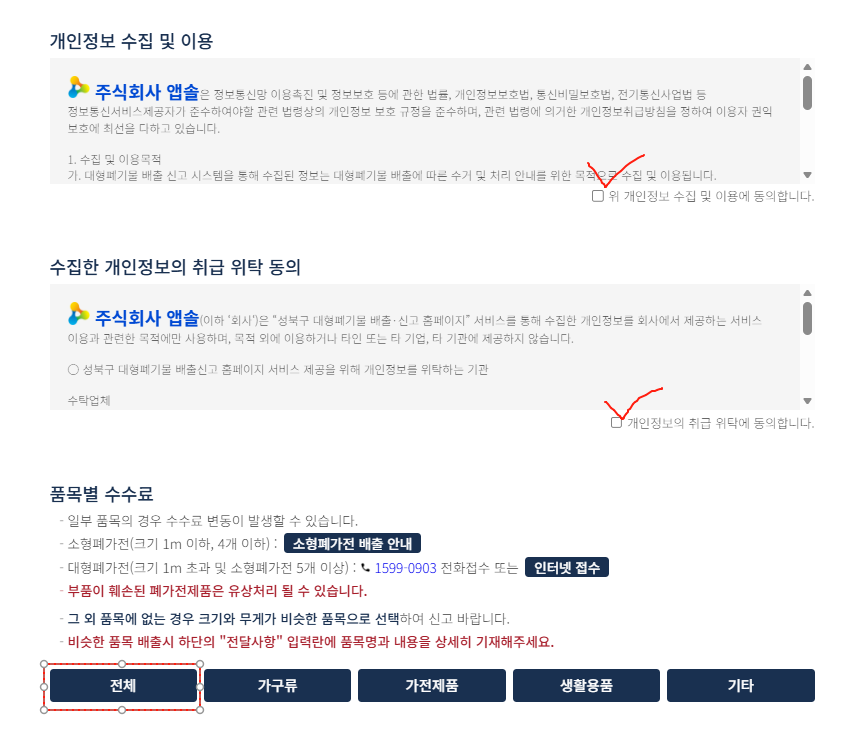
3. Agree to the privacy terms
Just below the form, tick the two consent boxes — 개인정보 수집 및 이용에 동의합니다 (I agree to the collection and use of my personal information) and 개인정보의 취급 위탁에 동의합니다 (I agree to entrusting its handling). The same area shows the fee guide and the item categories: 전체 (All), 가구류 (Furniture), 가전제품 (Appliances), 생활용품 (Household goods), and 기타 (Other).
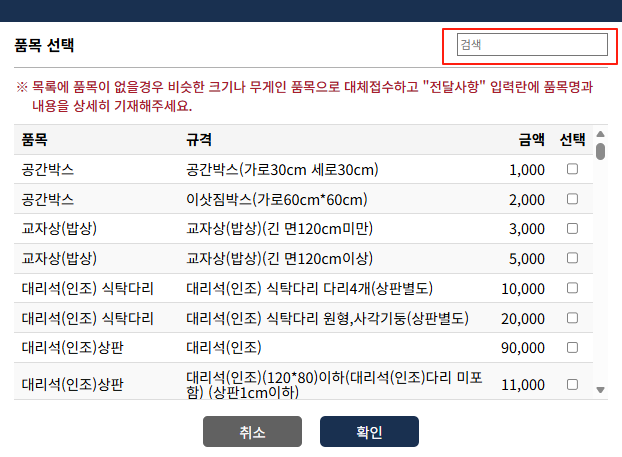
4. Find and select your item (품목 선택)
Click 전체 (All) or a category, then use the search box (검색) to find your item. The list shows each item (품목), its size spec (규격), and price (금액); tick 선택 (Select) and click 확인 (Confirm). If your exact item isn’t listed, choose the closest one by size and weight.
5. Review, add notes, and submit (신청하기)
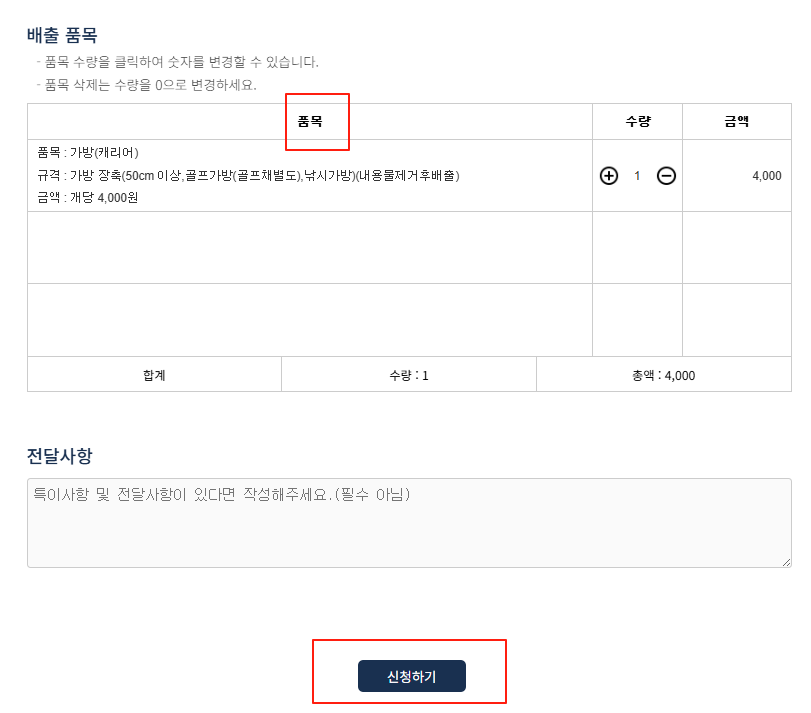
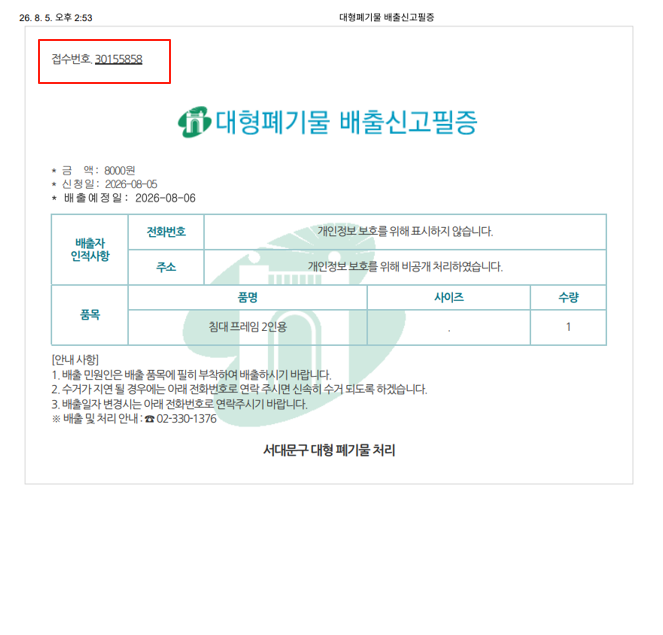
Your choices appear under 배출 품목 with quantity (수량) and price (금액) — click the number to change the quantity, or set it to 0 to remove an item. A suitcase (가방/캐리어), for example, is 4,000 won. Add anything relevant in 전달사항 (notes, optional), then click 신청하기 (Submit) and pay online by card or bank transfer. You’ll get a report number and a printable disposal certificate (singo piljeung, 신고필증).
Marking the Item: Three Accepted Ways
Once you’ve paid, mark the item so collectors know it’s been reported. Any of these works:
- Print the disposal certificate or sticker and attach it to the item.
- Write the report number on a plain sheet of white paper and attach it.
- Write the report number directly on the item with a marker.
Then place the item at the location and on the date you selected — not earlier. Putting bulky items out without a report can lead to a fine.
Prefer to Do It Offline?
If you haven’t set up Korean phone authentication yet, you can skip the website entirely: buy a bulky-waste sticker in person at your community center (dong office, 동주민센터) or a designated shop nearby, pay the fee, and attach it.
Large Appliances: Free Pickup
For large electronics — refrigerators, washing machines, air conditioners, TVs, and the like — you don’t pay at all. A nationwide service collects them free from your home. Book online through the E-Cycle Governance site or call 1599-0903 on weekdays. A single large appliance qualifies on its own; small appliances are usually collected free when you have several or when they go along with a large one. (In apartments, check with your management office first.)
A Few Tips
- Report a few days ahead — collection happens on set days, not immediately.
- Put the item out only at the assigned place and date to avoid a fine.
- Fees vary by district and item, so check your gu’s system for the exact amount.
- Moving out? Sort bulky-waste disposal before your move-out date so nothing is left behind.
Frequently Asked Questions
Q: Can foreigners use the online bulky-waste system?
Yes, but the sites use Korean phone-based identity verification, so you’ll need a Korean mobile number set up. If you don’t have one yet, you can buy a bulky-waste sticker in person at your dong office instead.
Q: How much does it cost to throw away furniture?
It depends on the item and your district — typically from a few thousand won for small items up to tens of thousands for large ones like sofas or mattresses. The exact fee is shown when you select the item in your district’s system.
Q: How do I get rid of a refrigerator or washing machine?
Large appliances are collected free through the nationwide pickup service — book online or call 1599-0903. You don’t need to buy a bulky-waste sticker for those.
Settling In Without the Clutter
Clearing out large items is one of those small tasks that’s easy once you know the steps — and especially worth sorting before a move. For the everyday sorting rules, see our waste separation guide. And if you’re still looking for your next place, tell us what you need through our inquiry form and we can help you find one that fits.
Browse Available Properties on Ziptoss →
Explore the Seoul rental map, filter by area, and inquire directly.